This site requires JavaScript, please enable it in your browser!
Greenfoot back
Recorsi
Recorsi wrote ...

2017/12/9

Stop actors from spawning on top of one actor?

1
2
3
4
Recorsi Recorsi

2017/12/9

#
Hello, Can i make a radius for a specific actor in which no other actor can spawn? This "safe area" should move as the actor moves. The actor that should have the safe area:
import greenfoot.*;  

/**
 * The main actor.
 * 
 * @author
 * @version 23.09
 */
public class Spaceship extends Actor
{
   private static final int NUM_FRAGMENTS = 20;
   GifImage myGif = new GifImage("spaceship.gif");
   private int dx;
   private int dy;
   Laser laser = new Laser();
   GreenfootSound Ton1 = new GreenfootSound("Laser.wav");
   private int horizontalSpeed = 5;
   private int verticalSpeed = 5;
   explosion explosion = new explosion();
   GreenfootSound ExSound = new GreenfootSound("Explosion.wav");
   private double v = 0;
   private int speed = 0;
   private static final int MAX_SPEED = 15;
   //private int counter = 10;
   GreenfootSound Ton = new GreenfootSound("Engine.mp3");
   public Spaceship()
   {
      GreenfootImage image = getImage();  
      image.scale(75, 52);
      setImage(image);
   }    
   public void act() 
   {
      Bewegen();
      pruefeKontaktRand();
      shoot();
      GIF();
      TriggerEx();
   }
      public void TriggerEx()
   {
     Rock rock = (Rock)getOneIntersectingObject(Rock.class);;
     if (rock != null && getNeighbours(getImage().getWidth()*8/10, false, Rock.class).contains(rock) && rock.hitsShip(this))
     {
        getWorld().addObject(explosion, getX()+1, getY()+1);
        explode2();
        ExSound.play();
        
        
     }
   }
   private void GIF()
   {
       setImage( myGif.getCurrentImage() );
       GreenfootImage image = getImage();
       image.scale(75, 52);
       setImage(image);
    }
   private void Bewegen()
   {
    

      if (Greenfoot.isKeyDown("a"))
       {
            turn(-4);
       } 
      if (Greenfoot.isKeyDown("d"))
       {
            turn(4);
       }
      if (Greenfoot.isKeyDown("w"))
       {
           
           speed++;
           if (speed > MAX_SPEED) speed = MAX_SPEED;
       } else if (speed > 0) speed--; move(-speed/3); 
    if (Greenfoot.isKeyDown("w"))
    {
        Ton.playLoop();
        Ton.setVolume(100);
    } else 
    {
        Ton.pause();
    }
      
      
      /*if (Greenfoot.isKeyDown ("w") && Greenfoot.isKeyDown("a"))
      {
          setRotation(310);
          
        }
      if (Greenfoot.isKeyDown ("w") && Greenfoot.isKeyDown("d"))
      {
          setRotation(50);
         
        } 
      if (Greenfoot.isKeyDown ("s") && Greenfoot.isKeyDown("a"))
      {
          setRotation(225);
         
        }
      if (Greenfoot.isKeyDown ("s") && Greenfoot.isKeyDown("d"))
      {
          setRotation(140);
          
        }  
  */ }
  private void pruefeKontaktRand()
  {
    if (getX() >=626) {
        dx = -dx;
        }  
    if (getX() <=14) {
        dx = -dx;
        }
    if (getY() >=466) {
        dy = -dy;
        }
    if (getY() <=14) {
        dy = -dy;
        }
}
/*private void shoot()
{
    if(Greenfoot.isKeyDown("space"))
    {
       World Spielfeld = getWorld();
       Spielfeld.addObject(laser, 0, 0);
       laser.setLocation(getX(), getY());
       laser.setRotation(getRotation()-90);
       Ton1.play();
       Ton1.setVolume(75);
    }
}*/
private void shoot()
 {
  if("space".equals(Greenfoot.getKey())){
    Laser laser = new Laser();
    getWorld().addObject(laser, getX(), getY());
    laser.setRotation(getRotation()-180);
    laser.move(40);
    Ton1.play();
   
  }
 }
public void explode2()
 {
   placeDestroyed (getX(), getY(), NUM_FRAGMENTS);
   DeathScreen deathscreen = new DeathScreen();
   ResetInfo resetinfo = new ResetInfo();
   getWorld().addObject(deathscreen, 450, 350);
   getWorld().addObject(resetinfo, 450, 500);
   getWorld().removeObject(this);
   Ton.stop();
 }
private void placeDestroyed(int x, int y, int numFragments)
{
   for (int i=0; i < numFragments; i++) {
       getWorld().addObject(new Destroyed(), x ,y );
    }
 }
}
And my current method to spawn in the other actors:
public void placeRocksBeginning()
    {
      for (int i = 0; i < 25; i++) {
        int x = Greenfoot.getRandomNumber(850);
        int y = Greenfoot.getRandomNumber(750);
        addObject ( new Rock(), x , y);  
        rock.setRotation(Greenfoot.getRandomNumber(260));
        }
    } 
    public void placeRocks()
    {
      {
        if(Greenfoot.getRandomNumber(70) == 1)
        {
          int x = Greenfoot.getRandomNumber(850);
          int y = Greenfoot.getRandomNumber(750);
          addObject(new Rock(), x, y);
          rock.setRotation(Greenfoot.getRandomNumber(260));
        }
      } 
    }

Thanks :)
danpost danpost

2017/12/9

#
Wherever the rocket is, you will be limiting the range of possible random x and y values by the diameter of the safe zone (the area around the rocket where no spawning of objects is to take place). After those random ranges are decreased, you safe zone, which is currently located at the end of the range, need to be shifted to encompass where the rocket actually is. This would involve adding the appropriate coordinate value of the rocket to the random number plus the radius of the safe zone; then, taking this sum and getting the remainder when divided by the appropriate dimension of the world. This result is a coordinate value where an object can be placed.
Super_Hippo Super_Hippo

2017/12/9

#
Without too much math involved, you could add the following to the Rock class. (Change the 100 to the radius of the safe zone.)
protected void addedToWorld(World w)
{
    while (!getObjectsInRange(100, Rocket.class).isEmpty())
    {
        setLocation(Greenfoot.getRandomNumber(850), Greenfoot.getRandomNumber(750));
    }
}
danpost danpost

2017/12/9

#
The following should suffice without any trying and retrying (no looping):
int range = 100;
int x = (Greenfoot.getRandomNumber(850-range*2)+getWidth()+range)%getWidth();
int y = (Greenfoot.getRandomNumber(750-range*2)+getHeight()+range)%getHeight();
addObject(new Rock(), x, y);
Super_Hippo Super_Hippo

2017/12/9

#
This code does not exclude a radius around an object. It excludes an area at the edge of the world with a width of 100.
danpost danpost

2017/12/9

#
Super_Hippo wrote...
This code does not exclude a radius around an object. It excludes an area at the edge of the world with a width of 100.
You are right. I forgot to include the coordinates of the rocket:
if ( ! getObjects(Rocket.class).isEmpty() )
{
    Actor rocket = (Actor)getObjects(Rocket.class).get(0);
    int range = 100;
    int x = (Greenfoot.getRandomNumber(850-range*2)+getWidth()+range+rocket.getX())%getWidth();
    int y = (Greenfoot.getRandomNumber(750-range*2)+getHeight()+range+rocket.getY())%getHeight();
    addObject(new Rock(), x, y);
}
Recorsi Recorsi

2017/12/9

#
Works great, thank you both :)
Super_Hippo Super_Hippo

2017/12/9

#
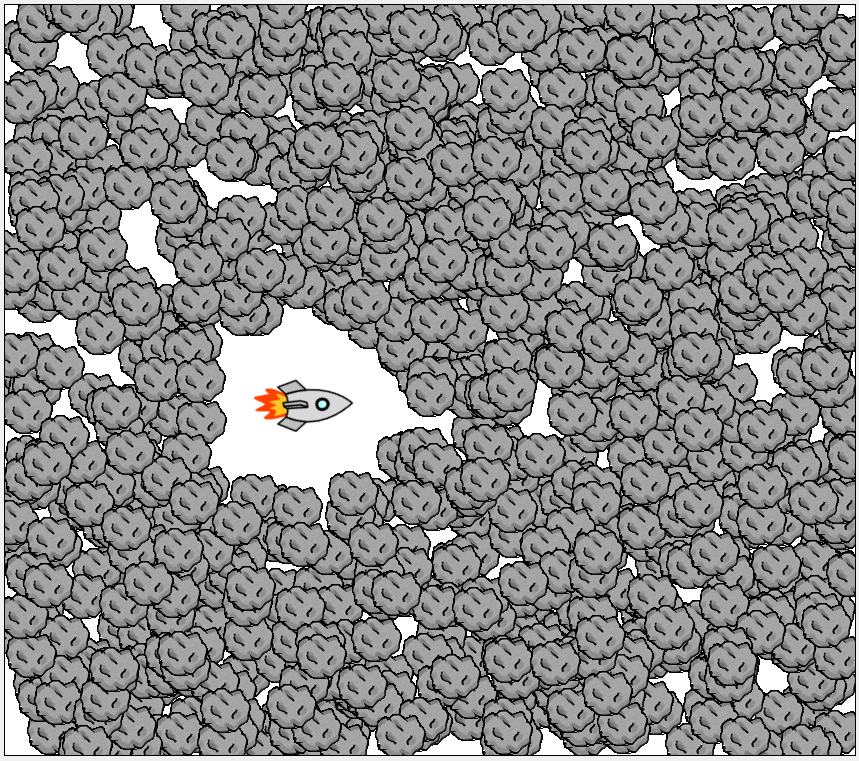
@danpost: This still does not do what is wanted. The code will exclude the x-coordinate and y-coordinate of the rocket ±100, so after adding 1000 rocks it looks like this for example: Adding 1000 rocks with my version looks like this: Yes, your version also excludes the 100 range, but also a lot more.
danpost danpost

2017/12/9

#
Super_Hippo wrote...
@danpost: This still does not do what is wanted.
Actually, I don't think it would be that bad. The rocket will probably be moving around (as well as the rocks).
Recorsi Recorsi

2017/12/16

#
Hey, i hope this topic isn't too old but i changed some things in my scenario and now i can't use "addedtoworld" anymore because it would override. danpost's code shows some errors to me, "cannot find symbol - method getObjects", the same with getHeight and getWidth. Do you know why? :)
Super_Hippo Super_Hippo

2017/12/16

#
If you use it in an Actor subclass, you need to use 'getWorld().' in front of those methods. Why isn't it possible to use it in the addedToWorld method? If you have another addedToWorld method, you could merge them together.
Recorsi Recorsi

2017/12/16

#
Super_Hippo wrote...
If you use it in an Actor subclass, you need to use 'getWorld().' in front of those methods. Why isn't it possible to use it in the addedToWorld method? If you have another addedToWorld method, you could merge them together.
Sorry, i don't know how to merge them together. this is what the other "addedtoworld" method looks like:
public void addedToWorld(World world)
    {
        xCoord=(double)getX();
        yCoord=(double)getY();
        drawMe();
    }
its in an other class
Super_Hippo Super_Hippo

2017/12/16

#
its in an other class
How does one override the other if they are in different classes? Is one the subclass of the other?
Recorsi Recorsi

2017/12/16

#
Super_Hippo wrote...
its in an other class
How does one override the other if they are in different classes? Is one the subclass of the other?
It is
Super_Hippo Super_Hippo

2017/12/16

#
So you have the Rock class and in it is the addedToWorld method I gave you and now, you have a subclass of Rock in which you want to have a new addedToWorld method. (?) What you can do depends on what you want with xCoord and yCoord and where these variables are created (Rock class or this subclass). And what is the drawMe method? What you could probably do is:
protected void addedToWorld(World world)
{
    super.addedToWorld(world);
    xCoord=getX();
    yCoord=getY();
    drawMe();
}
But maybe there is a better way.
There are more replies on the next page.
1
2
3
4