
This site requires JavaScript, please enable it in your browser!
Greenfoot back
Unicus
Unicus wrote ...

2014/4/16

Actor bouncing using vectors

Unicus Unicus

2014/4/16

#
Hello, I am stuck with making an actor bounce when it encounters a wall or atWorldEdge() It seems that the answer to this is so obvious, yet I can not get to it... Here is the code to it:
    private void checkCollision()
    {
        Actor Connector = getOneIntersectingObject(Connector.class);
        Vector bounce = new Vector(getRotation()-180, 0.5);
        if (Connector != null)
        {
            //accelerate(0.8); //walk slower
            //or
            //stop();
            //or
            addForce(bounce);
        }
             if(atWorldEdge())
        {
            //stop();
            addForce(bounce);
        }
    }
And the code for the vector:
    public Vector(int direction, double length)
    {
        this.length = length;
        this.direction = direction;
        updateCartesian();
    }

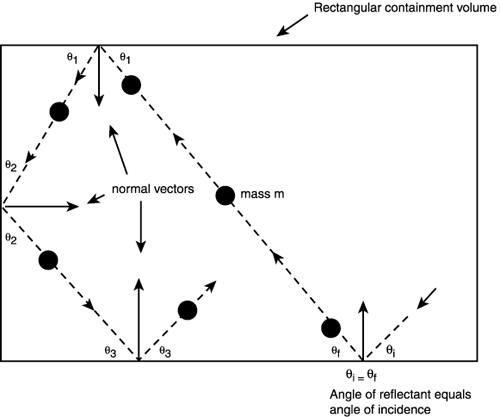
The problem with this is that when the getRotation() of the actor is 90 degrees for example, if I go forward, it bounces back, which is correct. However, if I go backwards (with the getRotation() of the actor still being 90 degrees, instead of bouncing forward, it goes back. I know that in terms of code, it's acting accordingly, so the code is right for how it acts, but not right for how it is intended to act. Can anybody please help me set the bounce = new Vector to act as intended? Thanks in advance!
Unicus Unicus

2014/4/16

#
If I do it like this:
Vector bounce = new Vector(getRotation()*(-1), 0.5);
Then it bounces correctly backwards and forward, but not on the sides.
davmac davmac

2014/4/16

#
Firstly, "bouncing" isn't normally about adding a fixed force but rather just changing the existing direction. So adding a vector of length 0.5 might sort-of look like it's doing the right thing, but it's not really a proper bounce. What you should really do is get the current movement vector and change its direction while preserving its magnitude. Now, bouncing generally also involves inverting the angle between the moving object and the normal to the place that the object is bouncing off. In this case the plane is the world edge, but the angle of this edge and therefore its normal is dependent on which edge it is (top/bottom, left/right). That's why your code doesn't work correctly in both cases: you need to detect which edge the actor is bouncing off, and then adjust the movement vector accordingly. This is a good illustration that I found on this page:
Unicus Unicus

2014/4/16

#
Firstly, "bouncing" isn't normally about adding a fixed force but rather just changing the existing direction. So adding a vector of length 0.5 might sort-of look like it's doing the right thing, but it's not really a proper bounce. What you should really do is get the current movement vector and change its direction while preserving its magnitude.
Well, it depends on the material, for example, if it's rubber, it's bouncing more, than if it is metal, therefore, the magnitude is adjusted according to the material that the actor is touching.
Now, bouncing generally also involves inverting the angle between the moving object and the normal to the place that the object is bouncing off.
Yes, that's why I did
getRotation()-180
However, that's the angle of the object, and not of the vector. Therefore, I made this:
    public int revertDirection()
    {
        dx = -dx;
        dy = -dy;
        updatePolar();
        return direction;
    }
and
Vector bounce = new Vector(movement.revertDirection(), 0.5);
But with this, the actor is acting strangely, in that even if it doesnt touch the walls, it walks very very very slowly...
Unicus Unicus

2014/4/16

#
I did it :D
    private void checkCollision()
    {
        Actor Connector = getOneIntersectingObject(Connector.class);
        
        if (Connector != null)
        {
            Vector bounce = new Vector(movement.revertDirection(), 0.5);
            //accelerate(0.8); //walk slower
            //or
            //stop();
            //or
            addForce(bounce);
        }
             if(atWorldEdge())
        {
            Vector bounce = new Vector(movement.revertDirection(), 0.5);
            //stop();
            addForce(bounce);
        }
    }
The reason it acted strangely was because the
Vector bounce = new Vector(movement.revertDirection(), 0.5);
Was out of the if condition, therefore kept reverting the Direction.
davmac davmac

2014/4/17

#
Well, it depends on the material, for example, if it's rubber, it's bouncing more, than if it is metal, therefore, the magnitude is adjusted according to the material that the actor is touching.
Sure, but I think you misunderstood me. Your code applies a force vector (using 'addForce') which is independent of the original object velocity. A true 'bounce' should take the original velocity into account, even if you want to reduce it by some proportion.
Unicus Unicus

2014/4/17

#
Sure, but I think you misunderstood me. Your code applies a force vector (using 'addForce') which is independent of the original object velocity. A true 'bounce' should take the original velocity into account, even if you want to reduce it by some proportion.
Yeah, I know what you mean, and I'll implement it :) There are many things to consider at this point still, and now I'm working on transmitting the collision power from one actor to another, Ill see if I manage that... :)
You need to login to post a reply.